"immediate" attribute is available in almost all user input JSF tags. This attribute is commonly called "Event Handling Attribute". The valid values for this attribute is either "true" or "false". If value of this property is set to "true", then the validation, conversion, and events associated with these components takes place in this phase instead of the Process Validation Phase.
Eg. Suppose you have a cancel button that ignores all form values then we used this attribute.
Showing posts with label JSF. Show all posts
Showing posts with label JSF. Show all posts
Thursday, February 11, 2010


Multiple faces-config.xml for JSF Application
We can use multiple faces-config.xml for JSF application, for that you have to specify file names for the JSF application in web configuration file(web.xml).
There is a built-in parameter of JSF named "javax.faces.CONFIG_FILES" we can use this paramete for JSF configuration files. This parameter can take any no. of files.
Add the following entry in web.xml file.
<context-param>
<param-name>javax.faces.CONFIG_FILES</param-name>
<param-value>
/WEB-INF/faces-config1.xml,
/WEB-INF/faces-config2.xml,
/WEB-INF/faces-config3.xml
</param-value>
</context-param>
There is a built-in parameter of JSF named "javax.faces.CONFIG_FILES" we can use this paramete for JSF configuration files. This parameter can take any no. of files.
Add the following entry in web.xml file.
<context-param>
<param-name>javax.faces.CONFIG_FILES</param-name>
<param-value>
/WEB-INF/faces-config1.xml,
/WEB-INF/faces-config2.xml,
/WEB-INF/faces-config3.xml
</param-value>
</context-param>
Difference between JSP-EL and JSF-EL
JSP-EL:
1. JSP-EL value expressions are delimited by ${..}.
2. The ${..} delimiter immediately evaluate the given expression, at the time when the page is processed.
JSF-EL:
1. JSF-EL value expressions are delimited by #{..).
2. The #{..) delimiter is deferred evaluation. With deferred evaluation ,the expression is evaluates whenever a value is needed.
1. JSP-EL value expressions are delimited by ${..}.
2. The ${..} delimiter immediately evaluate the given expression, at the time when the page is processed.
JSF-EL:
1. JSF-EL value expressions are delimited by #{..).
2. The #{..) delimiter is deferred evaluation. With deferred evaluation ,the expression is evaluates whenever a value is needed.
Difference between Managed and Backing Beans in JSF
Managed Beans: Java Bean Objects managed by JSF implementation is called Managed Bean, It is nothing but describe how beans are created and managed(scope). Managed Beans are automatically created by the framework at runtime. Managed Beans can be put in request, session and Application context.
Backing Beans: Java Beans Objects that associated with UI component is called backing bean. It is basically holds data of associated UI component and may contains business logic. The backing beans may also contains other methods for validations and events for that UI component. The Backing Beans are referenced by form(JSF/JSP page). The Backing Beans can be put in request scope only.
Sometime Backing Beans is also called View Objects, View Objects are specifically used in Presentation Layer. It contains data and logic to validate, events and interact with business logic tier.
Backing Beans: Java Beans Objects that associated with UI component is called backing bean. It is basically holds data of associated UI component and may contains business logic. The backing beans may also contains other methods for validations and events for that UI component. The Backing Beans are referenced by form(JSF/JSP page). The Backing Beans can be put in request scope only.
Sometime Backing Beans is also called View Objects, View Objects are specifically used in Presentation Layer. It contains data and logic to validate, events and interact with business logic tier.
Wednesday, February 10, 2010
How to Declare Message Bundle in JSF
There are two ways to declare Message Bundle in JSF:
1. Simply configured in faces-config.xml file.
<application>
<resource-bundle>
<base-name>wiki.com.messages</base-name>
<var>message</var>
</resource-bundle>
</application>
2. Use built-in JSF tag to declare Message Bundle. this should be for each and every jsf page. If same message is used for multiple pages then this should not be a good choice.
<f:loadBundle baseName = "wiki.com.messages" var="message"/>
1. Simply configured in faces-config.xml file.
<application>
<resource-bundle>
<base-name>wiki.com.messages</base-name>
<var>message</var>
</resource-bundle>
</application>
2. Use built-in JSF tag to declare Message Bundle. this should be for each and every jsf page. If same message is used for multiple pages then this should not be a good choice.
<f:loadBundle baseName = "wiki.com.messages" var="message"/>
Wednesday, January 20, 2010
Perform Length Validation on Text Field Component.
Bellow code snippet validate minimum and maximum length of a Input Text Field:
<h:inputText id="empName" value="#{employeeBean.name}"
size="25" minlength="5" maxlength="255"/>
<h:message
style="color: red;
font-family: ’New Century Schoolbook’, serif;
font-style: oblique;
text-decoration: overline" id="errors1" for="empName"/>
<h:inputText id="empName" value="#{employeeBean.name}"
size="25" minlength="5" maxlength="255"/>
<h:message
style="color: red;
font-family: ’New Century Schoolbook’, serif;
font-style: oblique;
text-decoration: overline" id="errors1" for="empName"/>
Using Implicit Objects in Component Value
Using Implicit object in JSF is same as Implicit object of JSP. but one thing is that, how to use those objects in component value. Bellow is a small code snippet for that:
<h:outputFormat title="thanks" value="#{bundle.ThankYouParam}">
<f:param value="#{sessionScope.name}"/>
</h:outputFormat>
This tag gets the name of the customer from the session scope and inserts it into the parameterized message at the key ThankYouParam from the resource bundle. For example, if the name of the customer is Prabir Karmakar, this tag will render:
Thank you, Prabir Karmakar.
<h:outputFormat title="thanks" value="#{bundle.ThankYouParam}">
<f:param value="#{sessionScope.name}"/>
</h:outputFormat>
This tag gets the name of the customer from the session scope and inserts it into the parameterized message at the key ThankYouParam from the resource bundle. For example, if the name of the customer is Prabir Karmakar, this tag will render:
Thank you, Prabir Karmakar.

Thursday, January 7, 2010
Elements of Navigation Rules in JSF
A navigation rule(facess-config.xml) of JSF consists of the following elements:
•<navigation-rule>*: The wrapper element for the navigation cases.
•<from-view-id>*: Contains either the complete page identifier (the context sensitive relative path to the page) or a page identifier prefix ending with the asterisk (*) wildcard character. If you use the wildcard character, the rule applies to all pages that match the wildcard pattern. To make a global rule that applies to all pages like Help Page, leave this element blank.
•<navigation-case>*: The wrapper element for each case in the navigation rule. Each case defines the different navigation paths from the same page.
•<from-action>: An optional element that limits the application of the rule only to outcomes from the specified action method. The action method is specified as an EL binding expression.
•<from-outcome>*: Contains an outcome value that is matched against values specified in the action attribute of UI components. Later you will see how the outcome value is referenced in a UI component either explicitly or dynamically through an action method return.
•<to-view-id>*: Contains the complete page identifier of the page to which the navigation is routed when the rule is implemented.
•<redirect/>: An optional element that indicates that the new view is to be requested through a redirect response instead of being rendering as the response to the current request. This element requires no value.
NOTE : * marked are mandatory elements
•<navigation-rule>*: The wrapper element for the navigation cases.
•<from-view-id>*: Contains either the complete page identifier (the context sensitive relative path to the page) or a page identifier prefix ending with the asterisk (*) wildcard character. If you use the wildcard character, the rule applies to all pages that match the wildcard pattern. To make a global rule that applies to all pages like Help Page, leave this element blank.
•<navigation-case>*: The wrapper element for each case in the navigation rule. Each case defines the different navigation paths from the same page.
•<from-action>: An optional element that limits the application of the rule only to outcomes from the specified action method. The action method is specified as an EL binding expression.
•<from-outcome>*: Contains an outcome value that is matched against values specified in the action attribute of UI components. Later you will see how the outcome value is referenced in a UI component either explicitly or dynamically through an action method return.
•<to-view-id>*: Contains the complete page identifier of the page to which the navigation is routed when the rule is implemented.
•<redirect/>: An optional element that indicates that the new view is to be requested through a redirect response instead of being rendering as the response to the current request. This element requires no value.
NOTE : * marked are mandatory elements
Tuesday, July 21, 2009
What is JavaServer Faces
JSF is new standard framework, developed through Java Community Process (JCP) that makes it easy to build user interfaces for java web applications by creating reusable components in a page. You can think of JSF framework as a toolbox that is full of ready to use components. So JSF applications are event driven. You typically embed components in a jsp page using custom tags defined by JSF technology and use the framework to handle navigation from one page to another. Components can be nested within another component, for example, input box, button in a form. JSF is based on well established Model-View-Controller (MVC) design pattern. Applications developed using JSF frameworks are well designed and easy to maintain then any other applications developed in JSP and Servlets. Unlike request-driven MVC web frameworks, JSF uses a component-based approach. The state of UI components is saved when the client requests a new page and restored when the request is returned JSF includes: A set of APIs for representing user interface (UI) components and managing their state, handling events and input validation, converting values, defining page navigation, and supporting internationalization and accessibility A default set of UI components Two JavaServer Pages (JSP) custom tag libraries for expressing a JavaServer Faces interface within a JSP page. A server-side event model State management Managed Beans (JavaBeans created with dependency injection)
Advantages of using JSF
- JSF provides standard, reusable components for creating user interfaces for web applications.
- SF provides many tag libraries for accessing and manipulating the components.
- It automatically saves the form data and repopulates the form when it is displayed at client side.
- By design and concept it allows creating reusable components. That will help to improve productivity and consistency.
- Many quality and ready to use components are available from Apache, Richfaces, Infragistics, Oracle, etc.
- The concept of action and action listener for button invocation is good.
- Has very good support for EL expression that improves the user interface code readability.
- The concept the validator is excellent.JavaScript code is embedded as part of the component.
Features Of JSF
JSF is a rich featured framework of JAVA technology. Some of the features are given bellow:
- JSF is standard web user interface framework for Java.
- JSF is a component framework.*
- UI components are stored on the Server.*
- Easy use of third party components.
- Event driven programming model.*
- Events generated by user are handled by the server.
- Navigation handling.*
- Can automatically synchronize UI components.
- International language support.*


JSF and MVC
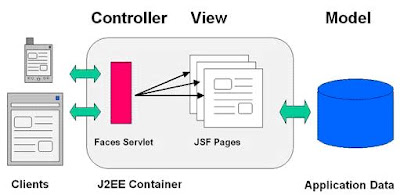
JSF was developed integrating MVC design pattern so that applications can be designed well with greater maintainability. To understand this we need to understand what is MVC design pattern, how MVC helps to design and maintain an application.The MVC design pattern is divided into three separate parts: Model: handles data and logic. View: handles output (presentation) Controller: handles processing of an application. Controllers are used to process user actions. In JSF, Model part (Business logic) is handled by the Managed Beans (backing beans). View is handled by UI Components. Controller is Faces Servlet.

JSF Component
Components in JSF are elements like text box, button, table etc. that are used to create UI of JSF Applications. These are objects that manage interaction with a user. You can create:
- Simple components, like text box, button and
- Compound components, like table, data grid .
A component containing many components inside it is called a compound component.
JSF allows you to create and use components of two types:
Standard UI Components: JSF contains its basic set of UI components like text fields, check boxes, list boxes, panel, label, radio button etc. These are called standard components. For example:
UIForm represents a user input form that is a container of other components. UICommand represents UI components like buttons, hyperlinks and menu items.
UIInput represents UI components like text input fields, numeric input fields.
Custom UI Components: Generally UI designers need some different, stylish components like fancy calendar, tabbed panes. These types of components are not standard JSF components. JSF provides this additional facility to let you create and use your own set of reusable components .These components is called custom components. One of the greatest powers of JSF is to support third party components .Third party components are custom components created by another vendor. Several components are available in the market, some of them are commercial and some are open source. You can use these pre-built & enhanced components in UI of your web application .Suppose u need a stylish calendar , u have an option to take it from third party rather than creating it .This will help you to save your time & cost creating effective & robust UI and to concentrate on business logic part of web application.If you want to create custom components then its necessary to either implement UIComponent interface or extend UIComponentBase class that provides default behavior of components. These may be responsible for its own display or the renderer is used for its display. These components are stored in component tree on the server and they maintain state in between client requests. These components are manipulated on the sever in java code.
Monday, July 20, 2009
Taglibrary for JSF
JSF application typically uses JSP pages to represent views. JSF provides some useful special tags to enhance these views. JSF provides 43 tags in two standard JSF tag libraries:
- JSF Core Tags Library
- JSF Html Tags Library
Even a very simple page uses tags from both libraries.
<%@ taglib uri=”http://java.sun.com/jsf/core“ prefix=”f” %>
In the above code fragment we have imported two JSF tag libraries with the help of taglib directive. JSF Core Tag Library contains set of JSF core tags while JSF Html Tags Library contains set of html tags. Prefix is used to use tags defined in tag library. Here we are using conventional names f and h for Core & Html tags respectively. We have the choice to choose any name for the prefixes.
JSF Html Tags
JSF HTML tags are divided into following category:
Inputs (inputText, inputTextarea)
Outputs (outputText, outputLabel)
Commands (commandButton)
Selections (selectOneRadio, selectOneListbox, selectOneMenu for radio buttons, list boxes, menu etc)
Layouts (panelGrid)
Data table (dataTable)
Errors and messages (message, messages)
Some examples have been given below to understand how to use these tags and its attributes:
Inputs (inputText, inputTextarea)
Outputs (outputText, outputLabel)
Commands (commandButton)
Selections (selectOneRadio, selectOneListbox, selectOneMenu for radio buttons, list boxes, menu etc)
Layouts (panelGrid)
Data table (dataTable)
Errors and messages (message, messages)
Some examples have been given below to understand how to use these tags and its attributes:

In JSF Html Tag Library there are 25 core tags:
- column creates column in a dataTable
- commandButton creates button
- commandLink creates link that acts like a pushbutton
- dataTable creates a table control
- form creates a form
- graphicImage displays an image
- inputHidden creates hidden field
- inputSecret creates input control for password
- inputText creates text input control (single line)
- inputTextarea creates text input control (multiline)
- message displays the most recent message for a component
- messages displays all messages
- outputFormat creates outputText, but formats compound messages
- outputLabel creates label
- outputLink creates anchor
- outputText creates single line text output
- panelGrid creates html table with specified number of columns
- panelGroup used to group other components where the specification requires one child element
- selectBooleanCheckbox creates checkbox
- selectManyCheckbox creates set of checkboxes
- selectManyListbox creates multiselect listbox
- selectManyMenu creates multiselect menu
- selectOneListbox creates single select listbox
- selectOneMenu creates single select menu
- selectOneRadio creates set of radio button
JSF Core Tags
These tags allows you to take advantages of features of JSF framework, like validation, conversion , event handling. Core library is stepchild of Html library. i.e. core library supports the html library. Core tag library also contains tags for views and sub-views , loading resource bundle, adding arbitrary text to a page. Some examples of JSF core tags are given bellow:
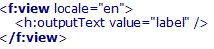
- f: view tag is used to create top level view
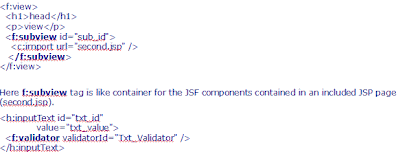
- f: subview tag is used to create subview of a view.
- f: validator tag is used to add a validator to a component.
- f: converter tag is used to add an arbitrary converter to a component.
- f: actionListener tag is used to add an action listener to a component.
- f:valueChangeListener tag is used to add a valuechange listener to a component
Some examples have been given below to understand how to use these tags:
f: view tag is used to create top level view and is a container for all JSF component tags on a page. Where locale attribute provides several options for presenting localized views of your application. Here "en" represents English and if we give velue "fr" to locale attribute then french view will be displayed. So this attribute is useful for internationalization purpose.
The Validator tag registers a Validator on the component associated with the enclosing tag. In validatorId field, we give the value of one of the validator-id element of a validator in your Faces configuration file.
In JSF Core Tag Library there are 18 core tags.
- f :view Creates the top-level view
- f:subview Creates a subview of a view
- f:attribute Adds an attribute to a component
- f:param Constructs a parameter component
- f:converter Adds an arbitrary converter to a component
- f:converterDateTime Adds a datetime converter to a component
- f:converterNumber Adds a number converter to a component
- f:actionListener Adds an action listener to a component
- f:valueChangeListener Adds a valuechange listener to a component
- f:validator adds a validator to a component
- f:validateDoubleRange Validates a double range for a component’s value
- f:validateLength Validates the length of a component’s value
- f:validateLongRange Validates a long range for a component’s value
- f:facet Adds a facet to a component
- f:loadBundle Loads a resource bundle, stores properties as a Map
- f:selectitems Specifies items for a select one or select many component
- f:selectitem Specifies an item for a select one or select many component
- f:verbatim Adds markup to a JSF page
Subscribe to:
Posts (Atom)